The Restore Time Plan
A small-office planner for the day the files are gone: how long the restore really takes in real bytes at the speed your line really delivers, whether it fits the downtime you can afford, what it costs to bring the data back, and which files come back first
Soozo's four IT calculators each answer part of one question and never meet. The Data Storage Converter turns a size into another unit, the Bandwidth Calculator times a transfer at a line's rated speed, the Uptime / SLA Calculator turns a percentage into hours of downtime, and the Cloud Cost Calculator prices data leaving a cloud. The question an office asks on its worst day needs all four at once: how long until we have our files back, does that fit the downtime we can afford, and what does it cost? The Restore Time Plan puts them together in seven steps. A file share Windows shows as 1,200 GB is really 1,200 GiB, 1,288.49 GB; a 200 Mbps plan moves 25 MB a second at best; and at 80% of that rated speed the full restore takes 17 h 54 min, not the 13 h 20 min of the quick sum. A 99.9% target allows 8.76 hours a year, so it does not fit. The plan holds the restore against your budget, prices the way back ($115.96 at a $0.09 per GB egress rate), and closes the gap the cheaper way: the 150 GiB first-day set restores in 2 h 15 min, a local copy on the office network brings everything back in 3 h 35 min, where the faster line a salesperson would offer needs 409 Mbps and fits by seconds. A timed test restore then replaces the rule of thumb with your own speed. Every figure is computed from our own calculators and every worked number is an example. It names no backup, cloud or internet provider, promises no recovery, calls its 80% planning speed and the 3-2-1 rule rules of thumb, and asks for no sign-in details. Included: 24 printable pages with seven steps, a restore inventory, a restore time worksheet, a test restore log, a recovery order card, a restore time table and a quickstart, plus a personalised sheet worked from the size, line speed, availability target and egress price you enter in our calculators.
What’s inside
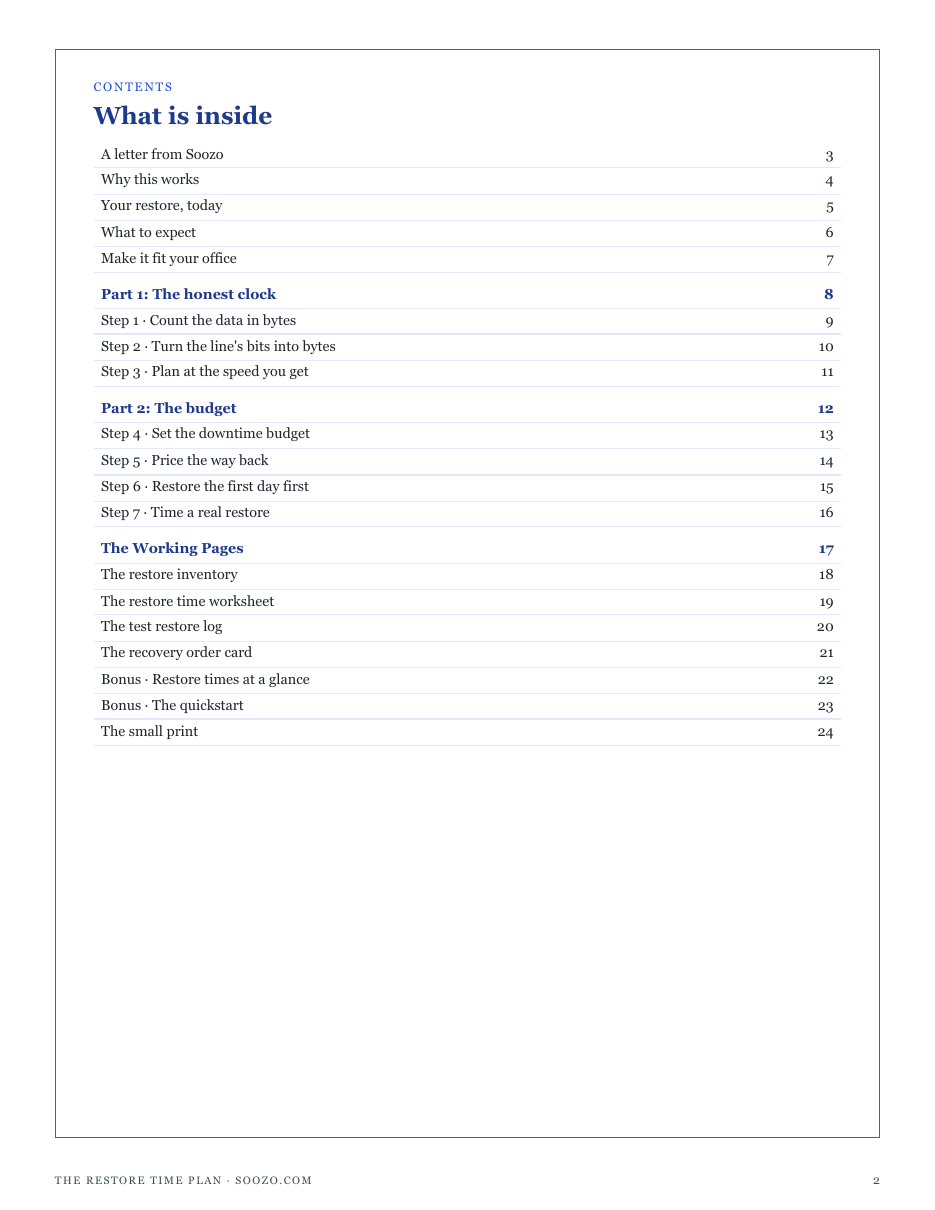
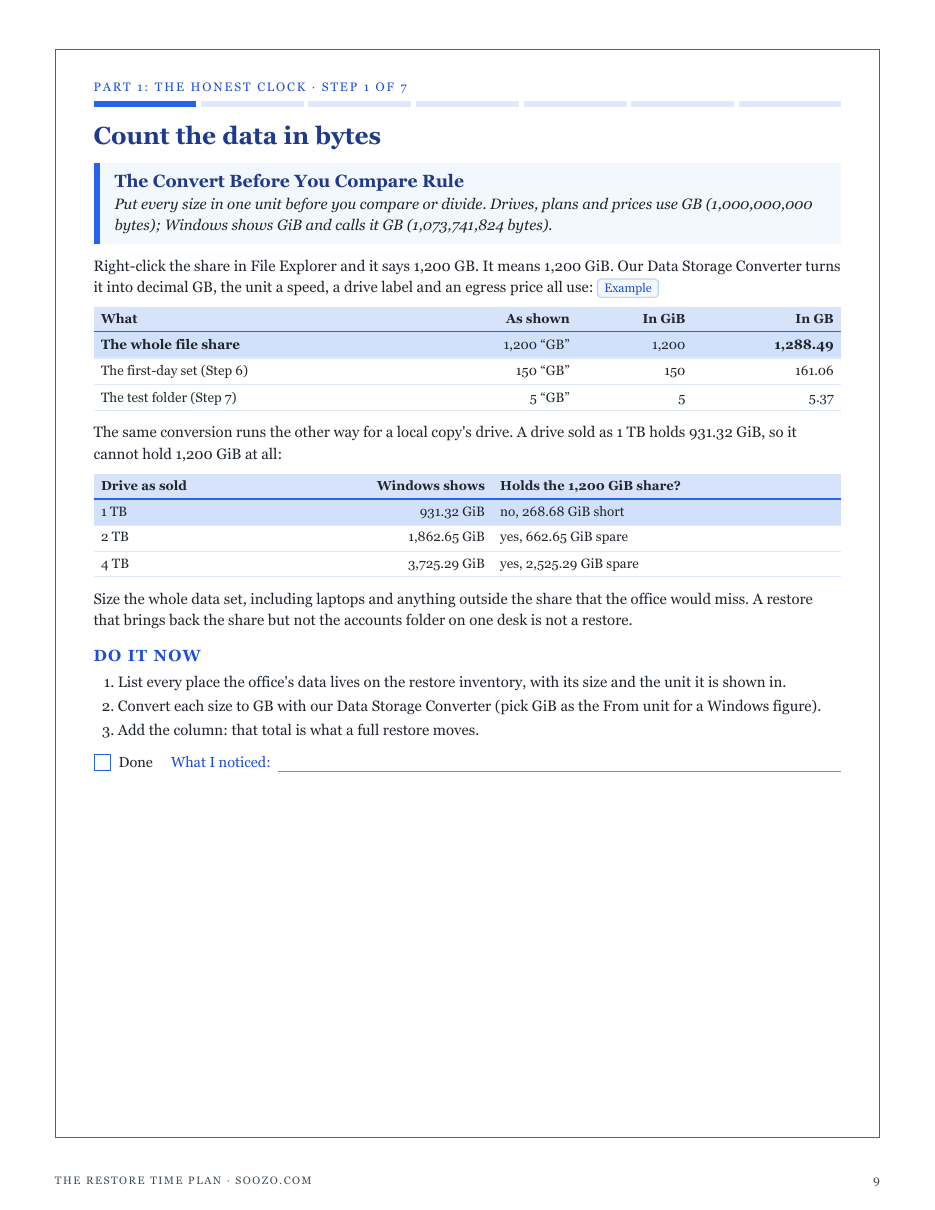
- The Convert Before You Compare Rule: every size in real bytes, the GiB Windows calls GB, and a 1 TB drive that shows 931.32 GiB
- The Divide by Eight Rule: a plan's megabits as megabytes a second and GiB restored an hour, on the download side
- The Plan at 80 Rule: the restore timed below the rated speed until you measure, and why the quick sum runs hours short
- The One Restore Spends the Year Rule: an availability target as a downtime budget in hours, and whether a full restore fits
- The Price the Way Back Rule: the egress cost of a test, a first-day set and a full restore, from your provider's own rate
- The First Day First Rule: a first-day set, a local copy, or a faster line, compared against the budget
- The Time a Real Restore Rule: a timed test restore to a new folder, and the plan re-timed at the speed you measured
- Four working pages: a restore inventory, a restore time worksheet, a test restore log and a recovery order card
- A restore time table (five sizes, five plan speeds), downtime budgets for five targets, and a quickstart
- A personalised sheet worked from the size, line speed, availability target and egress price you enter in our calculators
Run one of the free calculators first and buy from that page, and this sheet is computed from your own figures. Buy from here and the pack still arrives complete — the sheet simply has no numbers of yours to work from yet.
14-day refund, no questions asked. If the pack is not what you needed, email support@graburl.com and we refund you in full — you do not have to justify it or delete the file. Full policy.
$15.00 including any taxes · PDF, 24 pages · instant download, link valid 7 days and 5 downloads.
Sold by GrabURL. The charge appears on your statement as GrabURL.
Refund policy · Terms of sale · support@graburl.com